 thumbish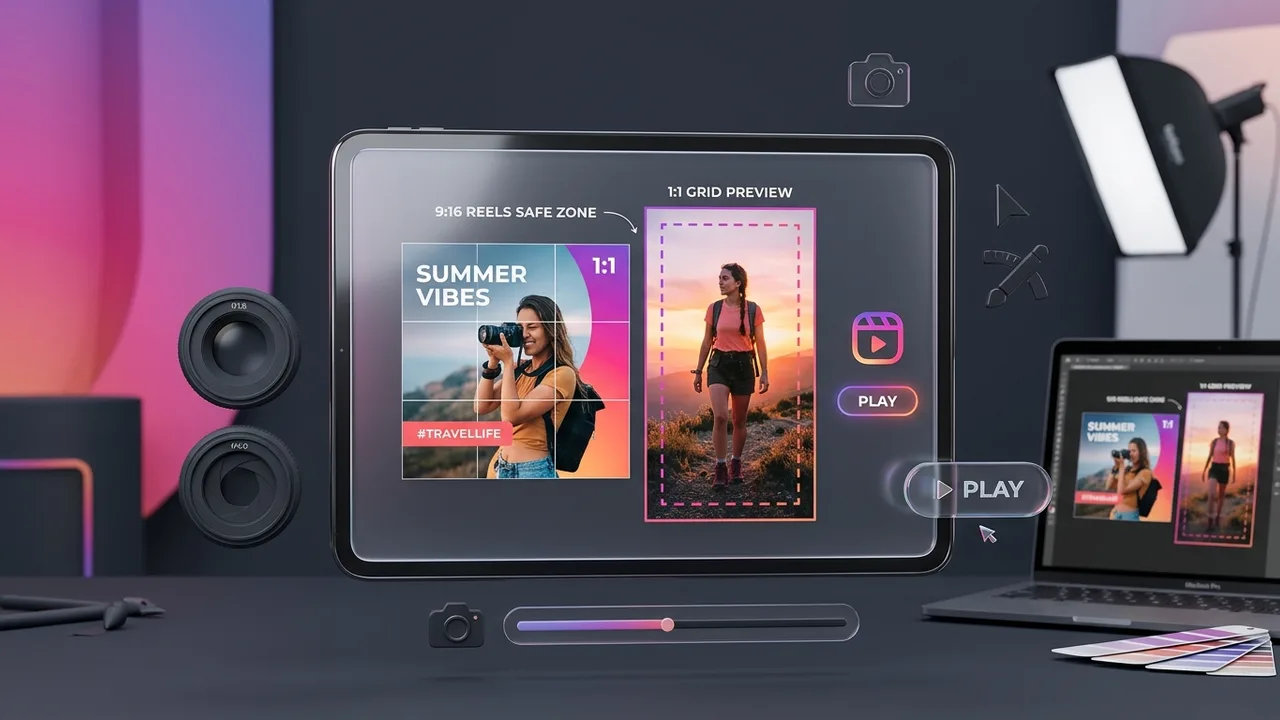

The Double-Crop Dilemma: 9:16 Fullscreen vs. 1:1 Profile Grid
Designing an Instagram video thumbnail is technically more demanding than designing for YouTube because of how Instagram handles aspect ratios across different surfaces. When someone scrolls through the dedicated Reels tab, your video displays in full 9:16 vertical glory (1080 × 1920 pixels). But when an interested viewer taps into your creator profile to browse past content, that same video cover gets aggressively cropped into a square 1:1 box (1080 × 1080 pixels) taken strictly from the vertical center.
If your headline text sits near the top of the 9:16 frame, or your product is held near the bottom, your profile grid will showcase awkwardly chopped words and decapitated faces. A truly professional Instagram video cover is designed with strict safe-zone awareness: high-impact visual aesthetics across the entire 9:16 canvas, with all critical semantic information locked firmly inside the center 1:1 boundary.
- Full Canvas: 1080 × 1920 pixels (9:16 aspect ratio).
- Center Profile Grid Safe Zone: 1080 × 1080 pixels (middle 56% of total height).
- Top Danger Zone: Top 420 pixels (visible only in full Reel view; cropped on profile).
- Bottom Danger Zone: Bottom 420 pixels (covered by username, caption, and audio tags in Reels).
Coming Soon to Thumbish: Dedicated Vertical & Multi-Ratio Studio
Notice for Instagram & TikTok Creators: Thumbish currently generates high-resolution 16:9 landscape thumbnails optimized for YouTube desktop, mobile, and living room smart TV screens. However, native 9:16 vertical image generation—equipped with real-time Instagram 1:1 grid overlay previews, TikTok UI safe-zone guides, and multi-platform ratio exports—is currently in active engineering as an upcoming studio feature.
In an upcoming release, creators will be able to toggle aspect ratios directly in their prompt workspace (16:9 for YouTube, 9:16 for Reels & TikTok, and 1:1 for Carousels), allowing one video brief to generate cohesive artwork across every major video distribution channel without manual third-party cropping.
How Creators Currently Adapt Thumbish Concepts for Instagram
While waiting for the native vertical generator, top creators frequently repurpose Thumbish-generated concepts into high-converting Instagram covers using a 3-step reframing workflow:
1. Generate with Center-Focused Composition: When prompting Thumbish, request a centered subject and tight background staging (e.g., "Isolated creator holding the product dead-center, studio lighting with minimal clutter"). This keeps all essential visual elements inside the horizontal middle.
2. Canvas Expansion: Import the generated 1280 × 720 artwork into your preferred canvas tool or layout editor set to 1080 × 1920. Place the Thumbish artwork in the vertical center.
3. Background Ambient Fill: Use a blurred, darkened duplicate of the thumbnail artwork or an AI generative fill to softly extend the studio lighting into the top and bottom vertical bars. Add your headline text exclusively within the central 1080 × 1080 square preview.
- Keep creator eyes and expressions positioned in the upper half of the center square.
- Ensure the 1:1 square crop tells a self-contained story on your profile page.
- Avoid placing text in the bottom right corner where Instagram shows the video duration badge.
Typography for Instagram: The 2-Second Feed Glance Rule
Instagram is a high-velocity visual discovery app. Users flick their thumbs past dozens of Reels every minute. Unlike YouTube, where titles are printed boldly beneath the thumbnail in system fonts, Instagram video titles are often buried in lengthy captions underneath username tags.
Your thumbnail image must perform double duty: acting as both visual hook and headline. Use ultra-bold, heavyweight grotesque or geometric sans-serif fonts with high contrast (pure white lettering over dark background gradients or vibrant yellow on deep charcoal). Never use cursive scripts, ultra-thin editorial weights, or complex serif fonts that blur when scaled down on smaller smartphones.
4 High-Converting Cover Archetypes for Instagram Reels
Archetype 1: The Candid Freeze-Frame. A high-clarity snapshot capturing an unposed, mid-action moment (e.g. looking directly into an open packing crate with genuine surprise). Feels organic and avoids looking like a paid commercial ad.
Archetype 2: The Polarizing Statement Badge. A clean portrait with a high-contrast sticker tag displaying a controversial or counterintuitive statement: "STOP DOING THIS" or "3 GEAR REGRETS".
Archetype 3: The Minimalist Aesthetic Tease. A luxury product or clean interior bathed in golden hour natural lighting with a 2-word quiet headline ("MY SETUP"). Highly effective for design, lifestyle, and productivity niches.
Archetype 4: The Before/After Split Square. Showing the rough starting point on the left half and the final polished result on the right half, both positioned squarely inside the 1:1 grid safe zone.
The Grid Cohesion Test: Building a Cohesive Profile Aesthetic
Your individual video covers don’t live in a vacuum; they form a 3-column mosaic that defines your personal brand. When a viral Reel sends thousands of new visitors to your profile, a coherent visual grid transforms casual viewers into permanent followers.
Maintain a consistent color signature across your covers—such as recurring dark slate backgrounds with neon accent highlights or consistent font treatments. When your profile looks curated and intentional, visitors instinctively perceive your content as high authority and high value.