 thumbish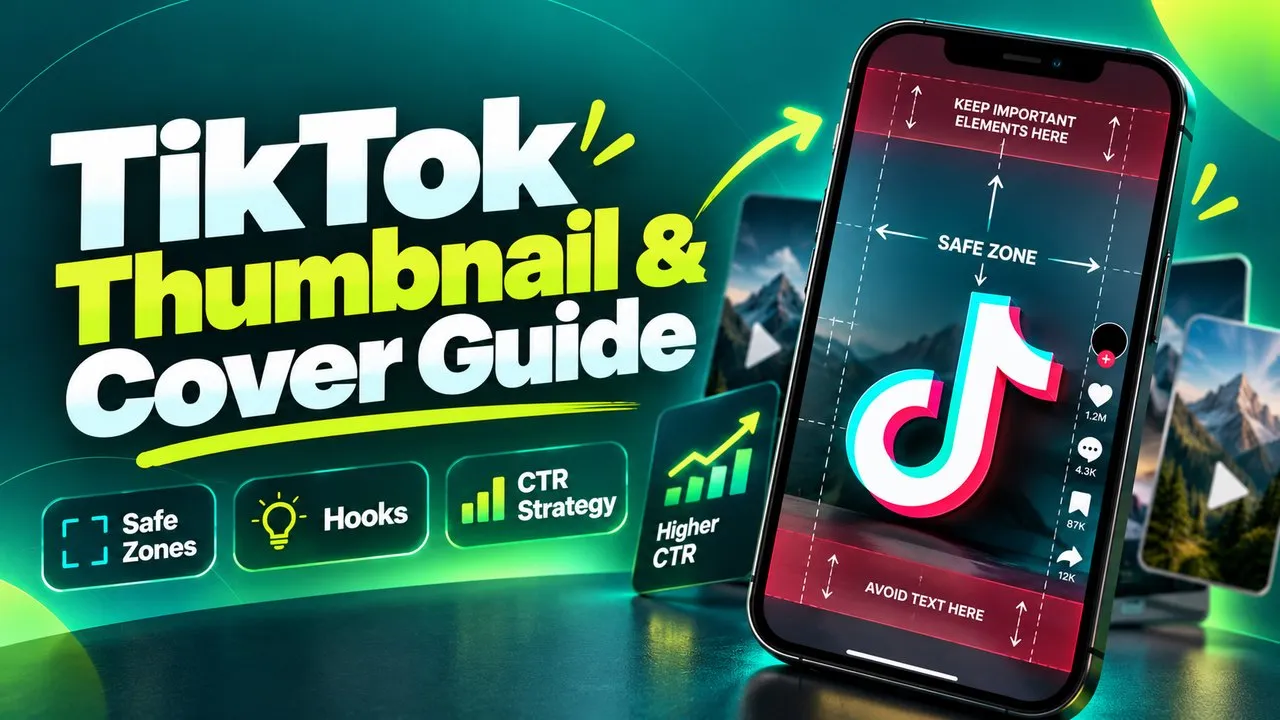

Rule 1: Never Settle for Frame 0 (Freeze the Tension, Not the Resolution)
When you upload a video, TikTok automatically defaults to using the very first frame (0:00.00) as your temporary thumbnail. In 90% of cases, this frame is a blurry transition, a neutral starting stare, or an awkward half-open mouth. Publishing without changing this default frame is the single biggest view killer on the platform.
Always scrub through your timeline on the upload screen to find the single frame packed with the highest visual friction. Look for:
1. Physical Climax: The moment a glass is tipping over, a skateboard wheel leaves the coping, or an unexpected package is opened.
2. Micro-Expressions: Genuine, unforced surprise, intense skepticism, or focused curiosity. Viewers mirror human emotions—an authentic reaction frame triggers instant empathy.
3. Object Reveal: The exact instant an unusual gadget or before-and-after contrast is exposed to the camera.
- Avoid frames where your eyes are half-closed or looking away from the camera/subject.
- Pick a frame with sharp focus and minimal motion blur.
- The frame should raise a question: "What just happened?" or "What happens next?"
Rule 2: Master the TikTok UI Safe Zones (Dodging the Hazard Overlays)
TikTok is not a blank canvas. Over 35% of the screen is permanently obscured by native user interface buttons, captions, and creator metadata. If your cover text or primary subject encroaches into these hazard areas, your thumbnail becomes illegible.
The 4 Critical Hazard Zones on TikTok:
• Top Hazard (0px–220px): The "Following | For You | LIVE" tabs and search magnifying glass.
• Right-Hand Hazard (960px–1080px): The creator avatar, like heart, comment counter, bookmark button, and share arrow.
• Bottom Hazard (1350px–1920px): The creator handle, 4-line caption preview, sound title, and spinning vinyl audio disc.
• Bottom-Left Commercial Hazard: For TikTok Shop or Spark Ad videos, a yellow shopping cart badge or sponsor tag covers the lower-left quarter.
The golden rule: keep all text and primary faces centered horizontally, locked inside the vertical safe zone between Y: 350px and Y: 1100px.
Coming Soon to Thumbish: Automated 9:16 Vertical Cover Studio
Note for Creators: Thumbish currently generates high-resolution 16:9 landscape thumbnails engineered for YouTube channels. However, a dedicated 9:16 Vertical Video Studio—featuring real-time TikTok UI safe-zone masks, 3:4 profile grid preview toggles, and multi-ratio batch exports—is currently in active engineering as an upcoming core platform feature.
This upcoming tool will allow creators to generate short-form covers directly from their script hooks with interactive TikTok and Reels overlay previews, guaranteeing perfect safe-zone alignment before upload.
Rule 3: Mobile-First Typography (The 2-Second Feed Scan Test)
Because TikTok feeds move at lightning speed, your cover text must register in the brain in under 300 milliseconds. Follow these strict typography rules:
• Font Style: Use ultra-bold grotesque or geometric sans-serif typefaces (like Impact, Bebas Neue, Montserrat Black, or TikTok’s native "Classic Bold").
• High Contrast Background: Always use a high-contrast backing block (e.g., pure white text inside a solid black rectangular pill, or intense safety yellow on dark charcoal). Never rely on transparent text floating over complex video backgrounds.
• Word Count: Limit text to 2 or 3 punchy words. Cut out filler words like "the", "a", or "in". Write "SECRET SETTING" instead of "Here is the secret setting you should turn on".
Rule 4: TikTok Search Optimization (Winning the 2-Column Grid)
TikTok has evolved into a full-fledged search engine for Gen Z and millennial audiences. When someone searches for a solution or product review, TikTok displays results in a 2-column card grid—identical to a mobile video library.
In this search view, videos do not auto-play audio until tapped. The viewer chooses which video to watch purely based on two signals: the video cover and the view count. Having a clear, authoritative thumbnail headline answering the user’s search query directly ("FIX THIS NOW" or "BEST UNDER $50") can triple your organic search views over competitor videos.
Rule 5: The 3:4 Profile Mosaic (Converting Casuals to Followers)
When an individual video goes viral on TikTok, thousands of curious viewers tap your avatar to see your profile page. TikTok displays past uploads in a 3-column grid cropped to a 3:4 vertical aspect ratio (1080 × 1440 pixels).
If your covers are chaotic, inconsistently cropped, or missing text hooks, visitors leave after 3 seconds. When your profile displays clean, aligned 3-word covers with consistent branding, visitors immediately recognize your content themes and hit "Follow" to binge your series.
The 6-Point Pre-Upload TikTok Thumbnail Checklist
Before tapping "Post" in the TikTok app, verify these 6 acceptance criteria:
1. Frame Quality: Did you scrub to a high-tension frame rather than accepting frame 0?
2. Right Rail Clearance: Is the rightmost 120 pixels of your text clear of the heart and comment buttons?
3. Bottom Caption Clearance: Is your headline placed entirely above Y: 1350px so the caption doesn’t block it?
4. 3-Word Limit: Does the text contain 3 words or fewer in heavy sans-serif type?
5. 3:4 Grid Crop Check: Does the text remain centered and readable when cropped into a 3:4 profile card?
6. Curiosity Hook: Does the image make the viewer wonder what happens next?